Cloudflare Workers vs WordPress hosting: when a business site no longer needs WordPress
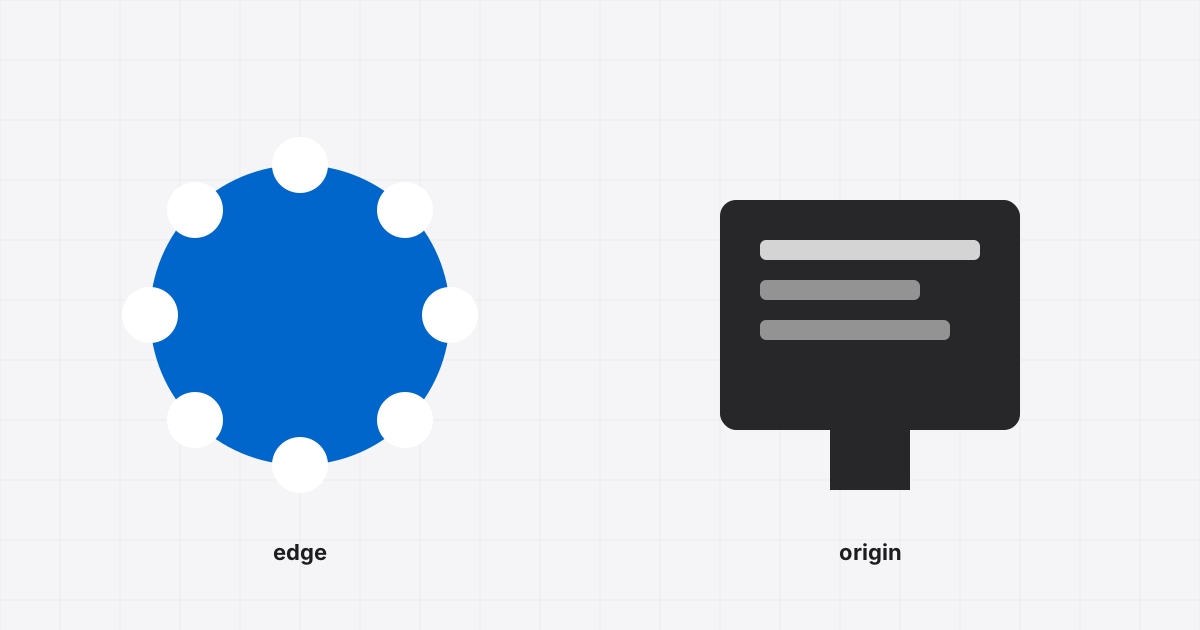
Most small business websites are five to fifteen pages, a contact form and an occasional blog post. For years the default answer was WordPress on managed hosting. That default is worth questioning now, because the same site can run on Cloudflare Workers with static assets for close to nothing, load faster everywhere, and remove the update treadmill entirely.
We did exactly this with our own site. This post is what we learned, and where the argument stops.
What "Workers with static assets" actually means
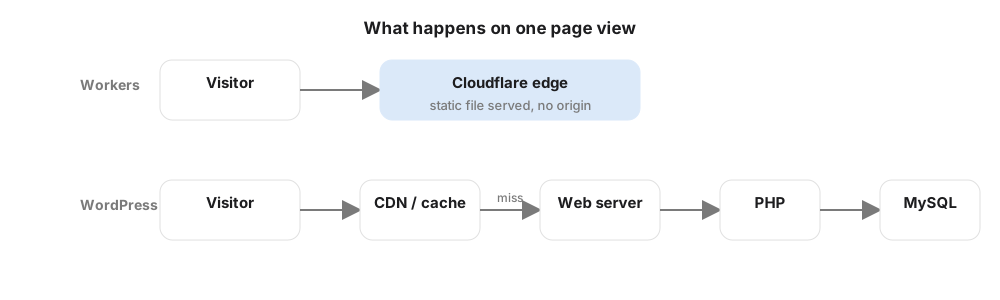
A Worker is a small piece of JavaScript that runs on Cloudflare's edge network, in every one of their data centres, close to the visitor. Since 2024 a Worker can also ship a folder of static files (HTML, CSS, images) that Cloudflare serves directly. The Worker code only runs for the few requests that need logic, like a contact form submission.
There is no origin server. Nothing to patch, nothing to reboot, no PHP version to worry about. Deploys take a few seconds from the command line.
Cost, honestly
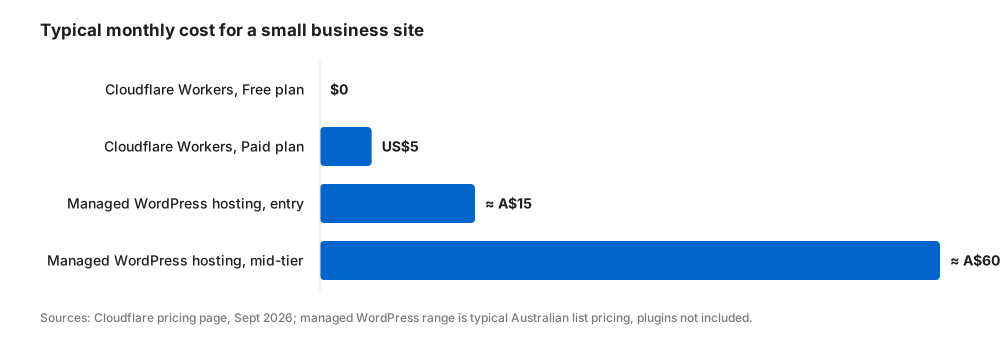
Cloudflare's numbers at the time of writing:
| Workers Free | Workers Paid | |
|---|---|---|
| Price | $0 | US$5 per month |
| Static asset requests | Free, unlimited | Free, unlimited |
| Worker requests | 100,000 per day | 10 million per month included |
| CPU time | 10 ms per invocation | 30 million CPU-ms per month included |
| KV storage (for form leads) | 100,000 reads and 1,000 writes per day | 10 million reads, 1 million writes per month |
| Email forwarding for your domain | Free | Free |
| SSL certificate | Free, automatic | Free, automatic |
For a brochure site the only Worker requests are form posts. A business getting fifty enquiries a day is nowhere near the free tier. Managed WordPress hosting for the same site runs somewhere between A$15 and A$60 a month, plus the premium plugins that usually come with it.
Speed
A static page from the edge typically arrives in well under 100 milliseconds anywhere in Australia, with no database query, no PHP, no page cache to warm. WordPress on a good host with caching can be quick too, but it is quick after someone configures caching, image optimisation, script deferral and a CDN, and it stays quick only while nobody installs a plugin that breaks it. We spend a meaningful share of every month on WordPress performance work for clients. On the Workers site there is nothing to tune.
Maintenance
This is the bigger win. A WordPress site needs core updates, plugin updates, PHP upgrades, backups, a security plugin, spam filtering and someone watching for the update that breaks the layout. A Workers site needs none of that. Our site is a folder of files in a repository, a 60-line Worker for the contact form, and a Cloudflare Turnstile widget to stop bots. If it works today it works next year.

Where WordPress still wins
None of this makes WordPress obsolete. Reach for WordPress when:
- Non-technical people publish regularly. The WordPress editor is the product. A static site needs a developer or a headless CMS in the loop.
- You need a plugin ecosystem. WooCommerce, booking systems, membership, multilingual, LMS. Rebuilding those on Workers is real engineering.
- The site is already there and working. A migration is only worth it if maintenance cost or performance is actually hurting you.
- Design is done in a page builder. If the client wants to drag sections around in Elementor, give them Elementor.
Where Workers wins
- Brochure and lead-generation sites with a form and a phone number.
- Landing pages for ad campaigns, where load time directly moves cost per lead.
- Sites that have been hacked or broken by updates more than once.
- Anything where the monthly hosting bill is larger than the value of the CMS.
The middle path
Two hybrids are worth knowing. Headless WordPress: keep WordPress as the editor, publish to a static front end on Workers, so editors keep their tools and visitors get the speed. WordPress plus edge caching: leave the site where it is and put Cloudflare in front of it with cache rules, which fixes most of the performance gap for a fraction of the effort.
What we recommend
For a new small-business site with a form and a handful of pages, we now default to Workers. For anything with real content operations or commerce, WordPress on a good host, tuned properly, with Cloudflare in front. If you are not sure which side your site is on, ask us. The answer usually takes ten minutes.