Using Elementor MCP with Claude: build pages in your design system from a prompt
Elementor opened its MCP integration to beta testers on 15 September 2026. Connected to Claude, it lets the model list, read, create and update Elementor pages using the site's own global classes and variables, and it saves everything as a draft for a human to review. Here is the setup and how we use it.
Prerequisites
- Elementor with beta features enabled and the Atomic Editor switched on. Elementor MCP works with Elementor 4 atomic elements, not classic sections and widgets.
- An administrator account on the site
- Claude Code, Claude Desktop, Cursor or Codex
Connect it
- In wp-admin, open the new Elementor MCP page.
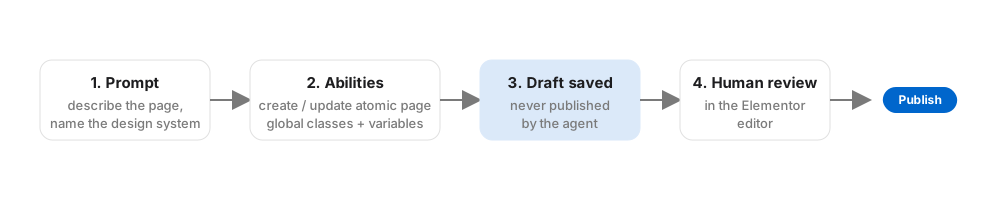
- Click to generate a setup prompt. Elementor creates an application password for the connection automatically and embeds it in the prompt.
- Paste that prompt into Claude Code or Claude Desktop. Claude registers the MCP server for you.
That prompt contains a credential. Do not paste it into shared channels, and regenerate it if it leaks.
What Claude can do once connected
- List Elementor pages and read the structure of any of them
- Build new atomic pages and layouts from a description
- Edit or redesign existing atomic pages
- Apply the site's global classes and design-token variables so new pages match the existing design
- Create theme parts such as headers and footers, manage components, connect dynamic content, and build custom widgets
Everything it produces is saved as a draft, as real, editable Elementor structure. If someone has the page open in the editor while the agent is working, Elementor flags the conflict. Pro elements need a Pro plan; the base abilities are free. Content management and multi-plugin workflows need Elementor's Angie assistant installed alongside.
Because Elementor registers these through the WordPress Abilities API, connecting once also exposes any other plugin abilities the site has, so the same Claude session can, for example, read WooCommerce or SEO data if those plugins publish abilities.
Prompts that work
Be concrete about the design system and the outcome, and ask for a draft you will review.
New landing page. "Create a draft page called 'Emergency plumbing Melbourne' using our existing global classes. Sections: hero with headline and call button, three service cards, testimonial, FAQ with five questions, closing CTA. Match the spacing and type scale of the Services page."
Variation. "Duplicate the header theme part into a draft called 'Header, campaign'. Replace the nav with a single 'Call now' button and keep everything else identical."
Structure review. "Read the Home page structure and list every element with hard-coded colours instead of a global variable."

Limits worth knowing
- Beta. Abilities will change. Expect the occasional gap.
- Atomic only. Classic-widget pages are readable but not rebuildable by the agent. Most existing sites are classic, so plan a migration or run new pages side by side.
- Drafts only. Good for safety, slower for bulk work. If you need bulk changes across classic pages, that is a job for a developer-level tool like Novamira, which we compared here.
For agencies, Elementor MCP is the safe way to let a non-developer ask for a page and get a draft that already fits the brand. We are running it on new builds now. If you want it wired up, get in touch.